 MetaMask


How to Get More Comments on YouTube in 2026 (The Open-Loop Discussion Strategy)

Channel audits, retention diagnostics, and creator growth strategies.
The Direct Answer: Begging viewers to “leave a comment down below” at the end of a video fails in 2026 because 70%+ of your audience has already clicked away. YouTube’s recommendation algorithm does not reward raw, passive comment counts; it rewards comment velocity and viewer retention vectors.
To spark genuine discussions that trigger Browse and Suggested recommendations, you must introduce an open-loop dilemma within the first 30 seconds, pin a high-friction two-choice question, and reply aggressively during the initial 2-hour cohort test window.
Want to know if people will comment before you post?
Stress-test your hook, topic, and thumbnail on ContentMatch. Get actionable feedback from creators in your exact vertical before burning 20 hours editing in a vacuum.
The Root Cause: You Have an Exposure & Connection Problem, Not a Comment Problem
When creators ask me how to get more comments on YouTube, my first question is always: Why do you actually want comments?
Most creators assume that if they can just force 50 comments onto a video, the YouTube algorithm will magically unlock the floodgates and hand them 100,000 views. But having audited content for over 15,000 creators, brands, and influencers, I can tell you that is backwards. You are focusing on an isolated engagement vanity metric rather than looking at your upload holistically.
Think about your own viewing behavior. When was the last time you commented on a video? You didn’t comment because the creator said “Don’t forget to like and comment!” while their outro music played. You commented because the creator said something either genuinely insightful, deeply relatable, or something you strongly disagreed with. A comment is not a chore—it is a conversation starter.
If nobody is commenting on your videos, you are usually facing one of two brutal truths:
- An Exposure Problem: Your video failed the initial 30-to-45-minute cohort test in YouTube Studio because the click-through rate (CTR) or 30-second retention was too weak. If YouTube only showed the impression to 80 people, you can’t expect an active discussion.
- A Connection Problem: Your video is a one-way lecture. You delivered information without creating any human friction, emotional stakes, or conversational openings.
Which Discussion Strategy Should You Use?
| Your Situation | Strategy | Expected Outcome | Works Best On |
|---|---|---|---|
| Viewers drop off before minute 2 | The 30-Second Open-Loop Dilemma | Plants a debate topic while 100% of audience is watching | Long-form tutorials & essays |
| People watch but leave 0 comments | The Pinned Friction Starter | 2x to 4x comment-to-view conversion via binary choice | All YouTube long-form videos |
| Impressions flatline after 24 hours | First 2-Hour Reply Sprint | Doubles initial thread depth and signals active viewer interest | Fresh uploads & live streams |
| Uncertain if hook or topic is engaging | Pre-Flight Peer Review | Eliminates dead air, weak hooks, and boring segments before render | ContentMatch Creator Circles |
Video Teardown: How the First 2 Hours Trigger Recommendation Waves
4 Proven Frameworks to Trigger Algorithmic Comment Velocity
Inject an Open-Loop Dilemma in the First 30 Seconds
Never wait until your outro to ask for comments. Look at your YouTube Studio audience retention curve: if your 30-second retention drops to 45%, more than half of your viewers will never hear your closing CTA.
Instead, present a counter-intuitive question or dilemma right as your hook lands. If you’re doing a tech review, don’t say “Today I’m reviewing the M4 MacBook Pro.” Say: “Most people are spending $400 upgrading the unified memory on this laptop, but after 30 days of testing, I think 90% of buyers are completely wasting their money. Tell me down below what your primary workflow is—video editing or coding—because my benchmarks might change your mind.”
You just gave them an immediate reason to scroll down and type their setup before the first minute is over.
Pin a Friction-Based Discussion Starter
An empty comment section creates psychological friction. Viewers hesitate to be the first person to speak. By pinning your own discussion starter the exact second your video goes live, you set the conversational frame.
The Mistake: Pinning “What did you guys think of this video?” That requires too much mental effort to answer, so viewers skip it.
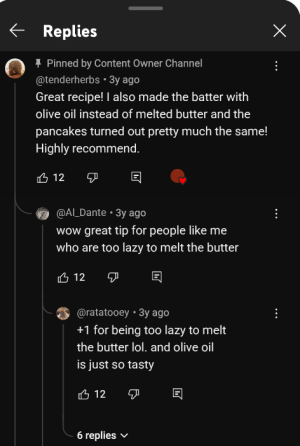
The Fix: Ask a forced binary choice or hot take. For example: “Be honest: would you pay $20/month for an ad-free YouTube experience, or will you keep using browser extensions until they stop working? I’m reading every reply.”
Execute the First 2-Hour Velocity Window
The YouTube recommendation engine tests new uploads in small cohorts every 30 to 45 minutes. When early viewers leave comments and you immediately reply with an open-ended follow-up question, two powerful things happen:
- You double your comment volume instantly: 15 comments become 30 comment interactions.
- You create secondary reply threads: Viewers get a phone notification that the creator replied to them, bringing them back to the video to respond again. That creates high session return velocity.
Never publish a video and walk away. Schedule your upload for a time when you can actively sit in Studio for 60 to 90 minutes answering every single human response.
Pre-Flight Peer Review: Eliminate Dead Air Before You Export
If your video pacing drags, viewers leave before they ever feel inspired to engage. On ContentMatch, creators in identical niches (Tech, Gaming, Finance, Education) review rough cuts and intros before publishing.
When 5 other active YouTubers in your vertical watch your first 60 seconds, they will immediately point out: “Your intro is 18 seconds too long,” or “Your question at 1:12 was confusing—rephrase it like this.” Fixing that before hitting publish is the difference between a video that dies at 40 views and one that sparks hundreds of authentic comments.
The Fatal Mistake: Why Engagement Pods & Sub4Sub Destroy Your Reach
A lot of small creators fall into the trap of Discord engagement pods or “comment-for-comment” threads. They get 20 friends or random creators to write “Great video bro!” or “Awesome content, keep it up!” on every upload.
Here is what you must understand about how modern recommendation algorithms work:
YouTube’s recommendation system relies on multi-dimensional user vectors. It matches videos to viewers based on shared watch history, niche interests, and search patterns. When a 54-year-old car enthusiast, a 16-year-old Minecraft gamer, and a gardening channel all comment on your crypto video through a pod, you completely scramble the algorithm. The recommendation system has no idea who your real audience is, so it stops suggesting your video to anyone.
That is why on ContentMatch, fake pod swaps are strictly banned. You only connect with verified peers in your exact content tier and vertical who audit your pacing and watch time legitimately.
Estimate Your Pre-Flight Feedback & Reach
Stop burning $500+ in ad spend or 40 hours of editing in a vacuum. Slide below to see what it costs to stress-test your video with verified vertical peers or seed real algorithmic momentum:
* The Alternative: Spending $50–$200 on cold Meta/TikTok ads just to discover your hook dropped off at second 1.5, or posting to dead silence. First test free on signup.
Want to Know If People Will Actually Comment on Your Next Video?
Drop your hook and topic into ContentMatch. Get rigorous, honest feedback on retention, pacing, and hooks from creators in your exact niche before you publish.
Frequently Asked Questions
Do YouTube comments help the algorithm push my video?
Yes, but indirectly. Comments themselves are not a raw ranking factor. High comment velocity signals to YouTube that viewers found the content stimulating enough to stay on the page and engage, which correlates strongly with extended session duration and browse expansion.
What is a good comment-to-view ratio on YouTube?
For most niches, a comment-to-view ratio between 0.5% and 1.5% is typical (e.g., 5 to 15 comments per 1,000 views). Channels using open-loop hook strategies and pinned friction questions regularly achieve 2.5% to 5%+.
Should I reply to every comment I receive?
Yes, especially during the first 2 hours post-upload. Replying with an open-ended question encourages secondary comments, doubling thread depth and bringing viewers back to the video via push notifications.
Does hearting a viewer’s comment send them a notification?
Yes. Hearting a comment triggers a dedicated YouTube notification and email to the viewer, acknowledging their feedback and encouraging repeat engagement on future uploads.